Facebook Dynamic Product Ads: How to Turn Your Catalog Into a Sales Machine
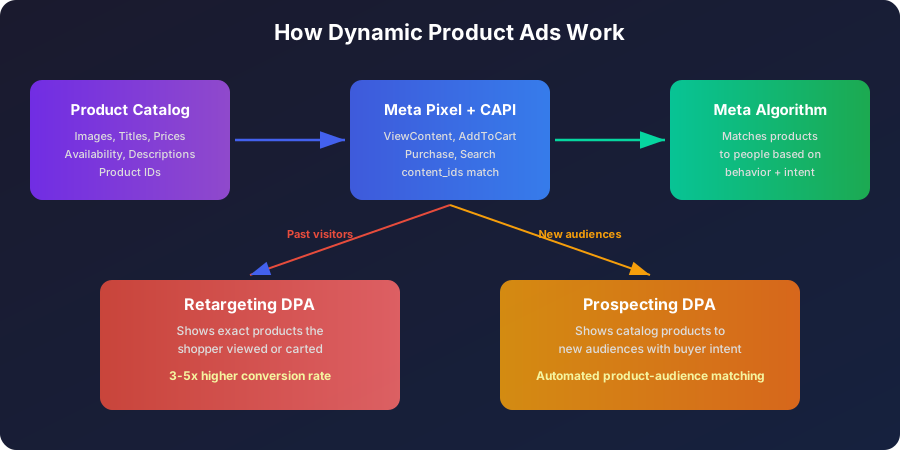
Dynamic Product Ads pull items from your product catalog and show them to people based on what they browsed, carted, or bought. You supply the catalog and set the rules. Meta picks which product to show each person. E-commerce brands running DPA at scale report 2-4x higher ROAS than static image campaigns because each impression matches a specific person to a specific product.
How Dynamic Product Ads Work
Three systems connect to make DPA run: your product catalog, your Meta Pixel (plus Conversions API), and Meta's ad delivery algorithm. The pixel tracks what visitors do on your site. The catalog holds your product data. The algorithm matches products to people.
A shopper views a red jacket on your store. The pixel fires a ViewContent event with that jacket's product ID. Next time she opens Instagram, DPA shows her that red jacket in the feed. No manual ad creation. Meta pulled the image, price, and title from your catalog and assembled the ad on the fly.
Retargeting DPA does that. Prospecting DPA goes one step further: it shows catalog products to people who never visited your site but whose browsing patterns signal purchase intent for items like yours. Meta's ML model reads your catalog, analyzes your conversion data, and surfaces products to fresh buyers.
Setting Up Your Product Catalog
Bad catalog data means bad ads. If a product entry has wrong prices, missing images, or stale availability, Meta either rejects it or shows the wrong thing to your customers.
Create a Catalog in Commerce Manager
- Open Commerce Manager in your Business Manager
- Click Add Catalog and select E-commerce
- Choose your data source: manual upload, pixel-based, or partner platform (Shopify, WooCommerce, BigCommerce)
- Assign the catalog to your ad account and pixel
If you run Shopify, the Meta channel app syncs your catalog automatically. For custom stores, you need a product feed.
Product Feed Requirements
Your feed is a file (CSV, TSV, XML, or Google Sheets) listing every product with required fields:
- id: Unique product identifier. Must match content_ids in your pixel events exactly. One mismatched character breaks retargeting for that product.
- title: Product name. Keep it under 150 characters. Front-load the brand and key attribute. "Nike Air Max 90 White Men's Running Shoe" beats "Running Shoe by Nike."
- description: Product details. 500 characters max. Include material, size range, and use case.
- availability: "in stock", "out of stock", or "preorder." Stale availability kills trust and wastes impressions.
- condition: "new", "refurbished", or "used."
- price: Format as "29.99 USD". Include sale_price separately if running promotions.
- link: Direct URL to the product page. Deep links only. Never point to a category page.
- image_link: Main product image. 1080x1080px minimum. White background, no text overlays, product fills the frame.
- brand: Manufacturer or your store name.
- google_product_category: Google's taxonomy ID for your product type. Helps Meta classify and target.
Feed Optimization That Moves Numbers

A clean feed gets approved faster and converts better. Optimize it so Meta has richer data for targeting decisions.
- Add additional_image_link fields. Up to 10 extra images per product. Carousel DPA pulls from these. More angles mean more engagement.
- Use product_type for granular segmentation. This field lets you create product sets by subcategory. "Shoes > Running > Trail" lets you build a DPA campaign targeting only trail runners.
- Add custom_label fields (0-4). Tag products by margin, season, best-seller status, or clearance. Run DPA campaigns showing only high-margin items. Exclude clearance products from prospecting.
- Keep prices current. If your feed shows $49 but the landing page shows $59, the customer bounces and Meta flags the discrepancy. Schedule feed updates every 1-4 hours for stores with frequent price changes.
- Remove out-of-stock items. Showing unavailable products wastes your budget and annoys customers. Filter them in your feed or use availability rules in Commerce Manager.
Pixel Events That Power DPA
DPA retargeting relies on specific pixel events firing with product IDs. Miss an event or pass wrong IDs and the whole system breaks.
Required Events
- ViewContent: Fires on product pages. Must include content_ids (matching your catalog IDs), content_type ("product"), and value.
- AddToCart: Fires when a product enters the cart. Same parameters plus quantity.
- Purchase: Fires on the thank-you page. Includes content_ids of all purchased products, value, currency, and num_items.
Recommended Events
- Search: Fires when someone searches your store. Helps DPA show relevant products to searchers.
- AddToWishlist: Fires on wishlist actions. Creates a warm audience segment between browser and cart adder.
- InitiateCheckout: Fires when checkout starts. Identifies people who began paying but dropped off.
The content_ids Problem
Mismatched product IDs kill DPA performance without warning. Your pixel sends content_ids when someone views a product. Your catalog has its own product IDs. If those two strings differ by a single character, retargeting breaks silently. No error in Ads Manager. You just see weak results because Meta can't connect viewed products to catalog items.
Go to Commerce Manager > Diagnostics > Event Match Rate. Below 90% means IDs are misaligned. Fix either your pixel implementation or your feed until they match.
DPA Retargeting: Bring Them Back

DPA retargeting shows people the exact products they looked at on your site. A shopper browses three pairs of shoes, leaves without buying, then sees those three shoes in her Instagram stories the next morning. That specificity drives 3-5x higher conversion rates than generic retargeting.
Build a Three-Tier Retargeting Funnel
Tier 1: Viewed but didn't add to cart (7-14 days)
- Show the exact products they viewed
- Use carousel format so multiple products appear
- Headline: Focus on the product benefit, not a discount
- Budget allocation: 40% of retargeting spend
Tier 2: Added to cart but didn't buy (7 days)
- Show carted products with urgency messaging
- Ad copy can reference limited stock or a small incentive
- This audience is hot. CPA should run 50-70% lower than cold traffic
- Budget allocation: 35% of retargeting spend
Tier 3: Past purchasers (30-90 days)
- Show complementary products, not the same item they already bought
- Use product sets filtered by category to cross-sell
- Exclude recently purchased items from the product set
- Budget allocation: 25% of retargeting spend
Retargeting Windows
Shorter windows catch hotter audiences in smaller pools. Longer windows give you more reach with weaker intent.
- 1-3 days: Highest intent. Small audience. Reserve for cart abandoners.
- 4-7 days: Strong intent. Good volume for mid-funnel retargeting.
- 8-14 days: Moderate intent. Works for view-based retargeting with fresh creative angles.
- 15-30 days: Cooling off. Use for broad reminders or seasonal pushes.
- 30-180 days: Cold retargeting. Only profitable during sales events or with strong new offers.
DPA Prospecting: Find New Buyers
DPA prospecting shows your catalog products to people who have never visited your site. Meta's algorithm decides which products to show each person based on their browsing patterns, your product data, and conversion signals from your pixel.
When Prospecting DPA Beats Static Ads
- You have 100+ products in your catalog
- Your pixel has 50+ purchases per week
- Your product images are clean and professional
- You sell visually driven products (fashion, home goods, accessories)
Prospecting Setup
- Create a campaign with Sales objective
- At the ad set level, select your product catalog
- Choose Broad audience or define a Lookalike
- Exclude anyone who purchased in the last 30 days
- Exclude your retargeting audiences to prevent overlap
- At the ad level, select Single image or Carousel with dynamic creative from your catalog
The algorithm tests hundreds of product-audience combinations you'd never build by hand. It might discover that 35-year-old women in Texas respond to your ceramic vases while 28-year-old men in New York click on your desk lamps. You'd never set up those ad sets. The machine runs the experiment for you.
Ad Creative for DPA
DPA pulls images and text from your catalog. You control the frame: overlay text, primary text above the ad, and the headline below the image.
Catalog Image Rules
- White or light solid background. Lifestyle shots work in additional images, not as the main catalog image.
- Product fills 75%+ of the frame. No tiny product centered in white space.
- No text, badges, watermarks, or promotional overlays on the image itself. Meta throttles delivery on text-heavy images.
- Consistent style across your catalog. Mixed image styles (some white background, some lifestyle, some low-res) make your carousel look amateur.
Template Customization
In Ads Manager, you can add overlays to DPA ads: price tags, discount badges, free shipping labels, and custom frames. Use them sparingly.
- Price overlay: Useful when your prices are competitive. Shows "$29.99" directly on the product image.
- Strike-through price: Shows original price crossed out with sale price. Effective during promotions.
- Free shipping badge: If you offer free shipping, display it. It removes a purchase objection right in the ad.
- Percentage off: "30% OFF" badge on the image. Use during actual sales, not permanently.
Ad Copy for DPA
Write primary text about the buyer's situation. The catalog already handles product details.
- Retargeting copy: "Still thinking about it? These are selling fast." Short. References their intent. Creates urgency.
- Cart abandonment copy: "You left something behind. Complete your order before it's gone." Direct callback to their action.
- Prospecting copy: "Discover [category] starting at $X. Free shipping on orders over $Y." Value-first introduction.
- Cross-sell copy: "Pairs well with your recent purchase." Assumes a relationship and adds value.
Product Sets: Segment Your Catalog
Product sets are subgroups within your catalog. You don't need to run DPA against all 5,000 products at once. Create sets based on category, price range, margin, or custom labels and run separate campaigns for each.
Practical Product Set Strategy
- Best sellers: Tag top 50 products with custom_label_0 = "bestseller". Run a dedicated DPA campaign showing only proven winners to cold audiences.
- High margin: Tag products with 40%+ margin using custom_label_1 = "high_margin". Prospecting campaigns can afford higher CPAs on these items.
- Seasonal: Tag spring/summer/fall/winter collections with custom_label_2. Rotate DPA campaigns by season without rebuilding.
- Price tiers: Create sets for under-$50, $50-$100, and $100+ items. Different price points need different audiences and copy.
- New arrivals: Filter by date added to catalog. Run a "New In" DPA campaign weekly targeting your warmest audiences.
Budget and Bidding for DPA
Budget Split
For stores running both retargeting and prospecting DPA, allocate budgets based on funnel stage and proven performance:
- Retargeting DPA: 20-30% of total ad spend. High ROAS, limited by audience size.
- Prospecting DPA: 50-60% of total ad spend. Lower ROAS but drives new customer acquisition.
- Testing and creative refresh: 10-20% of total ad spend. New product sets, copy variations, and overlay tests.
Bidding Strategy
- Lowest cost: Default for most DPA campaigns. Let Meta find conversions at whatever price the auction allows.
- Cost cap: Set a maximum CPA when you know your target cost per acquisition. Useful for prospecting with clear unit economics.
- ROAS target: Tell Meta your minimum return. Works best with 100+ weekly conversions feeding the algorithm.
Common DPA Mistakes and Fixes

- Mismatched content_ids. Your pixel fires product ID "SKU-123" but your catalog lists it as "sku123". DPA shows random products instead of viewed ones. Check Commerce Manager > Diagnostics to verify match rates.
- Stale feed data. Products go out of stock but your feed updates once a day. Customers click through, see "Sold Out," and bounce. Update your feed every 1-4 hours for active stores.
- No audience exclusions. Retargeting and prospecting campaigns compete for the same people. Exclude purchasers (last 7 days) from retargeting. Exclude all retargeting audiences from prospecting. Layer exclusions properly.
- Running DPA with under 20 products. The algorithm needs variety to match products to people. Small catalogs produce repetitive ads that fatigue fast. If you have fewer than 20 items, use standard image ads instead.
- Ignoring the product title. DPA shows your catalog title as the headline. "Widget Model X7-B Rev.3 (2pk)" means nothing to a customer. Rewrite titles for humans: "Wireless Bluetooth Earbuds - 24hr Battery."
- Same creative for retargeting and prospecting. Retargeting buyers already know your brand. Prospecting audiences don't. Use different primary text, overlays, and call-to-action buttons for each funnel stage.
- Not testing carousel vs. single image. Carousel shows multiple products per impression. Single image focuses attention. Test both. Carousel typically wins for retargeting. Single image can outperform for prospecting with hero products.
Scale DPA Without Account Limits
Agency ad accounts for Meta, Google, and TikTok. Pre-approved spending limits up to $50,000/day, priority support, and lower ban risk. Commission from 1% on top-ups.
Get Agency Accounts at AdCow →Scaling DPA: From $1,000 to $50,000/Month
$1,000-$3,000/month: Foundation
- Set up your product catalog and verify feed quality
- Install pixel events with correct content_ids and add CAPI
- Launch retargeting DPA for viewers (14 days) and cart abandoners (7 days)
- Start one prospecting DPA campaign with your full catalog and broad audience
- Monitor Event Match Rate daily until it's stable above 90%
$3,000-$15,000/month: Expansion
- Segment catalog into product sets by category, margin, and best-seller status
- Build the three-tier retargeting funnel described above
- Test prospecting DPA with Lookalike audiences (1-3%) alongside broad
- Add overlay templates: price tags for competitive items, sale badges during promos
- Test carousel vs. single image for each funnel stage
$15,000-$50,000/month: Volume
- Launch Advantage+ Shopping Campaigns with your catalog for maximum automation
- Create separate DPA campaigns per country for international expansion
- Rotate product sets weekly: push new arrivals, seasonal items, and restocks
- Build Custom Audiences from DPA engagement (people who clicked but didn't buy)
- Use value-based bidding with ROAS targets once you have 200+ weekly conversions
Frequently Asked Questions
How many products do I need for Dynamic Product Ads?
At least 4 products in your catalog for DPA to function, but 50 or more gives the algorithm enough variety to match products to people effectively. Single-product stores should use standard conversion campaigns instead.
Can I use DPA for prospecting or only retargeting?
Both. DPA retargeting shows people the exact products they viewed on your site. DPA prospecting uses catalog data and pixel signals to show products to people who never visited your store but match buyer profiles.
Why are my Dynamic Ads showing the wrong products?
Usually a feed issue. Check that content_ids in your pixel events match product IDs in your catalog. Mismatched IDs break the retargeting loop. Also verify your feed updates frequently enough that out-of-stock items get removed.
What image size works best for DPA catalog ads?
Use 1080x1080 pixels minimum for square format. Product images should have clean white backgrounds, fill at least 75% of the frame, and show the product clearly without text overlays.